Software
We rebuilt core components of Windows from the ground up to perform better in every way.
PerthTek Shell
Our own taskbar, Start menu and desktop, running in place of Windows Explorer's. File Explorer windows still open as usual.
Out of the way of your game
The Shell is compiled to native code and keeps to itself. While a full-screen game is in front it runs on the efficiency cores and pauses its own background checks, so it never competes with the game.
Yours to set up
Five themes, or one of your own: colours, a separate taskbar colour, eight accents, rounded or square corners. The taskbar sits top or bottom at the size you choose, on one display or all of them. Wallpapers, desktop icons, the clock and 16 languages are in the same window.
Always a way back
A separate guard watches the Shell. If it ever fails repeatedly, your session is handed to Windows Explorer by itself, and Ctrl+Alt+Shift+F12 switches to Explorer at any time. Each account chooses which one it signs in to.
Its own Task Manager
PerthTek Task Manager comes with it, in the same look: processes, performance, startup apps and details, with PerthTek World's live page built in.
What it uses
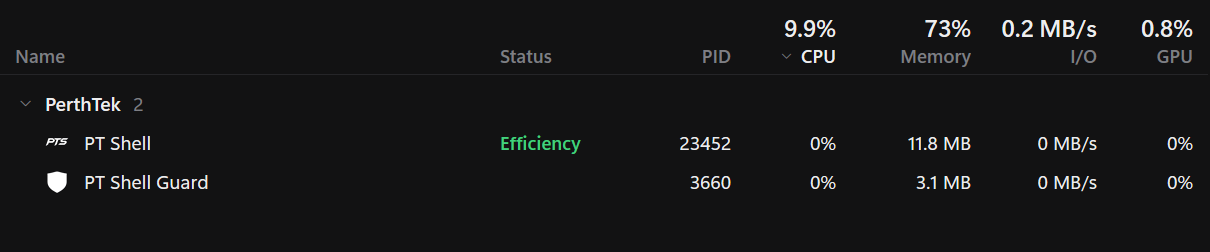
vs
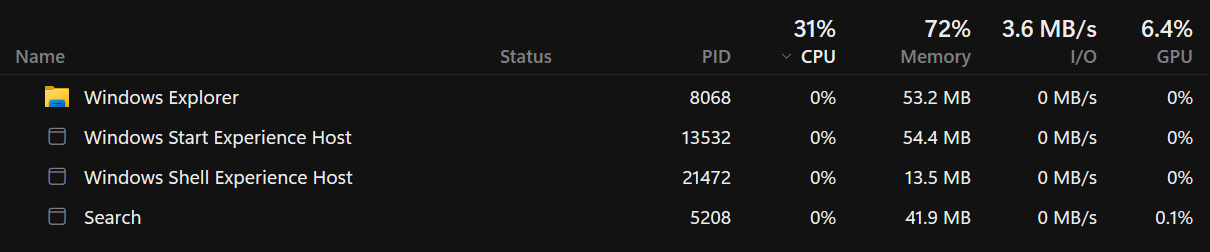


Measured on 23 November 2026 on a Snapdragon X2 Plus laptop with 16 GB of memory and Windows 11, each one minute after starting, on the same PC in the same session. Memory is the figure a task manager shows. PerthTek Shell 0.5.16 is PTShell.exe and its guard. Windows Explorer is explorer.exe with the three programs Windows runs for Start, flyouts and search, which the Shell does itself; the four rows were read one at a time and are shown together. After an hour and a half of use the Shell was at 34 MB.
PerthTek World
Our own program that keeps a game running at its best while you play. It never touches the game: it manages everything around it. World comes with Limitless.
These two are the real World page, drawn with sample data: World was not installed on the laptop they were made on. The memory reading in them is that laptop's own.
Your game comes first
While you play, your game gets first call on the processor and background apps drop to a lower priority. On processors that suit it, Core Shield gives the game most of the cores and keeps background apps in a small lane of their own.
Background apps stay quiet
Apps you aren't using are slowed while you play, and voice chat keeps working. If memory runs low, background apps give some back before your game feels it.
Graphics card at full speed
On NVIDIA and AMD cards, World holds the card's boost clock so it stays at full speed instead of dipping between frames, and lets go if the card needs to cool down.
You can watch it work
A live page in PerthTek Shell and in PerthTek Task Manager shows what World is doing at that moment. Everything else is kept quiet only until you stop playing.